The disaster recovery platform
Our DR product is three pieces: an agent on each protected host, a control plane that schedules and stores, and an operator console that will not tell you a comfortable lie about either.
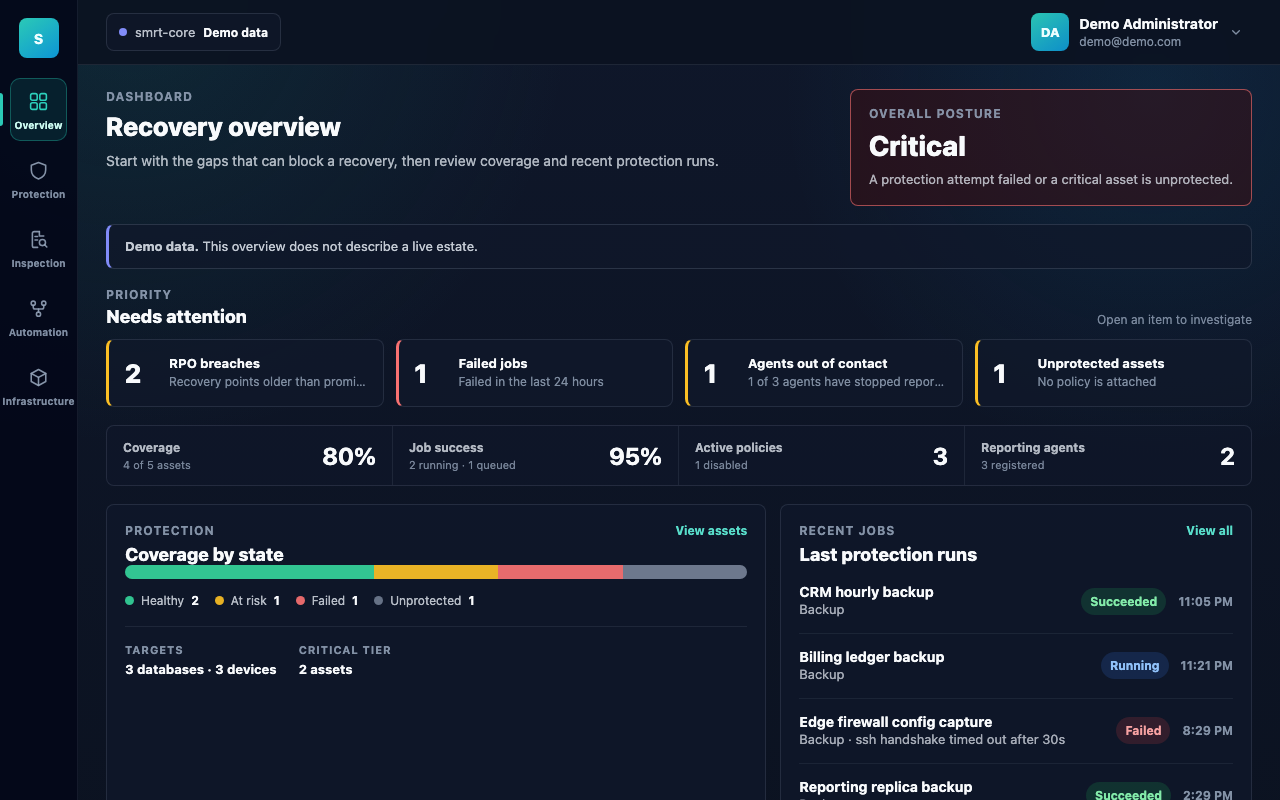
The dashboard opens on what could stop a recovery — RPO breaches, failed jobs, agents that have gone quiet — before it shows you anything reassuring. Screens on this page are the built-in demo dataset, which is why they are labelled as such: the console will not render sample data into a real session.
The agent
One binary per host, installed as a service. It holds the credentials for the databases, filesystems, devices and cloud accounts it protects, runs the work locally, and uploads the result in chunks over a mutually authenticated channel. An agent also reaches the network gear and cloud APIs assigned to it, so a switch or firewall never needs to be reachable from outside your network.
It dials outward. There is no inbound port to open, no listener to expose, and no firewall exception to defend in a review — which is usually the difference between a rollout that happens this quarter and one that does not.
Agents are enrolled with a single-use token, download their own build per platform, and have their certificates rotated from the console without being re-enrolled.
The control plane
Written in Go on top of PostgreSQL, and split into runtime modes — api, grpc and worker — so the component that serves the console is not the component that schedules the work. That separation is visible in the console rather than hidden by it: a node running api alone will serve you a dashboard while scheduling nothing, and the dashboard says so.
State is durable, migrations are versioned and embedded in the binary, and a half-applied schema refuses to serve rather than serving inconsistently.
The deployment is licensed offline. A .lic file issued by our licensing server is uploaded through the console and verified against keys compiled into the binary — nothing phones home. Without a valid licence the platform serves no agent at all: the agent channel refuses every call and enrolment is declined. That state is surfaced in the top bar and on every page, rather than left to be discovered by an estate that has quietly stopped being backed up.
Targets
A target is the thing being read.
| Kind | Covers |
|---|---|
| Database | PostgreSQL, MongoDB, ScyllaDB |
| Server | Linux and Windows hosts — filesystems, volumes, configuration and state directories |
| Network & security device | Cisco, Juniper, Palo Alto, Fortinet |
| Service | NGINX |
| Cloud account | AWS accounts, Azure subscriptions |
Registering a target does not protect it. Attaching it to a policy does — and the difference between those two states is exactly what the coverage figure measures.
The console asks the platform what it supports rather than carrying its own copy of the list, which is why a type offered in a picker is by construction a type that validates on save. That catalogue also carries what an operator needs to know before connecting to anything — including whether an agent of this release can actually dump the engine. PostgreSQL is the engine backed up end to end today. MongoDB and ScyllaDB are registered target types, and the console says so plainly rather than letting an asset read as covered when it is not; that is the kind of thing discovered at the restore.
Databases: pick the server, or pick a table
A PostgreSQL target is browsed the same way a Linux host is — database, then schema, then table — and the backup is narrowed to exactly what was selected.
| Selected | What is dumped |
|---|---|
| Nothing | The whole server: cluster roles and tablespaces, then every database the account can connect to |
| A database | That database, whole |
| A schema | That schema |
| A table | That table |
Dumps are pg_dump --format=custom, so a restore can be selective. The agent's probe checks the client tooling on its own host and reports a version that is too old for the server against the target, as soon as it is configured — rather than in a job at three in the morning.
Network and security devices
The firewall and the core switch are usually the least-backed-up things in an estate and the most painful to rebuild from memory. They are first-class targets here, on the same policies, schedules and retention as everything else.
Each device is registered with its hostname and address and assigned to an agent — the agent on your network is what reaches it, so nothing has to be exposed outward. When the agent connects it records what it actually found: product, version, whether the device answered, when, and which agent looked. A device with no agent assigned is reported as exactly that rather than silently sitting in the inventory looking protected.
Because a captured configuration is just a file in a recovery point, Inspection — below — works on it the same way it works on anything else: open Tuesday's config and Thursday's side by side and see precisely which lines moved. For a firewall ruleset, that is usually the question — not do we have a backup, but what changed since the last time this worked.
Cloud accounts
An estate running on AWS or Azure keeps most of what makes it itself outside any filesystem. The VPCs and virtual networks, the security groups, the IAM roles and role assignments, the load balancer rules, the DNS zones, the policy assignments — none of it is on a disk an agent can walk, and none of it is in a database an agent can dump. It lives in the provider's API, and the only copy of it is the provider's own.
Losing a subscription to a mis-scoped policy, a deleted resource group or a closed account destroys that as thoroughly as a failed array destroys a volume, and with considerably less warning. So an AWS account and an Azure subscription are protected targets in the same sense a firewall is: something reached over a management channel, whose running configuration is captured and versioned under the same policies as everything else.
What is captured is the control plane, never the data plane — the object inventory of a bucket, not the objects; the parameter group of a managed database, not its rows. Backing up the data is what the rest of this product does, and doing it twice under a different name would double your egress bill to produce a second, worse copy.
Seven configuration domains are named the same way on both providers — identity, networking, compute, storage, managed databases, DNS and governance — so a rule written against network reads the same whichever cloud it is pointed at. An empty selection means everything the provider offers, and an account registered before a service was supported starts capturing it when the build learns how.
The default way in stores no long-lived secret. On AWS that is the IAM role on the agent's own host; on Azure, the managed identity assigned to it. Assumed roles, access keys and app registrations are all supported for the estates that need them, and their secrets go to Vault — but the option most operators will take is the one with nothing to leak or expire.
Protected assets and coverage
A protected asset is a target with a policy and a criticality. The console tracks two things about it that most tools collapse into one:
- Protection status — what you declared. This asset should be protected, at this level.
- Protection state — what actually happened. The last run succeeded, failed, or has not happened inside the window the policy promised.
The state is re-derived from the clock on every read, so an asset silently ages from healthy into at-risk when no backup runs. It does not stay green because the last write said so.
Coverage is computed across the estate and excludes what you explicitly excluded, so an asset you deliberately left out does not quietly depress the number and train you to ignore it.
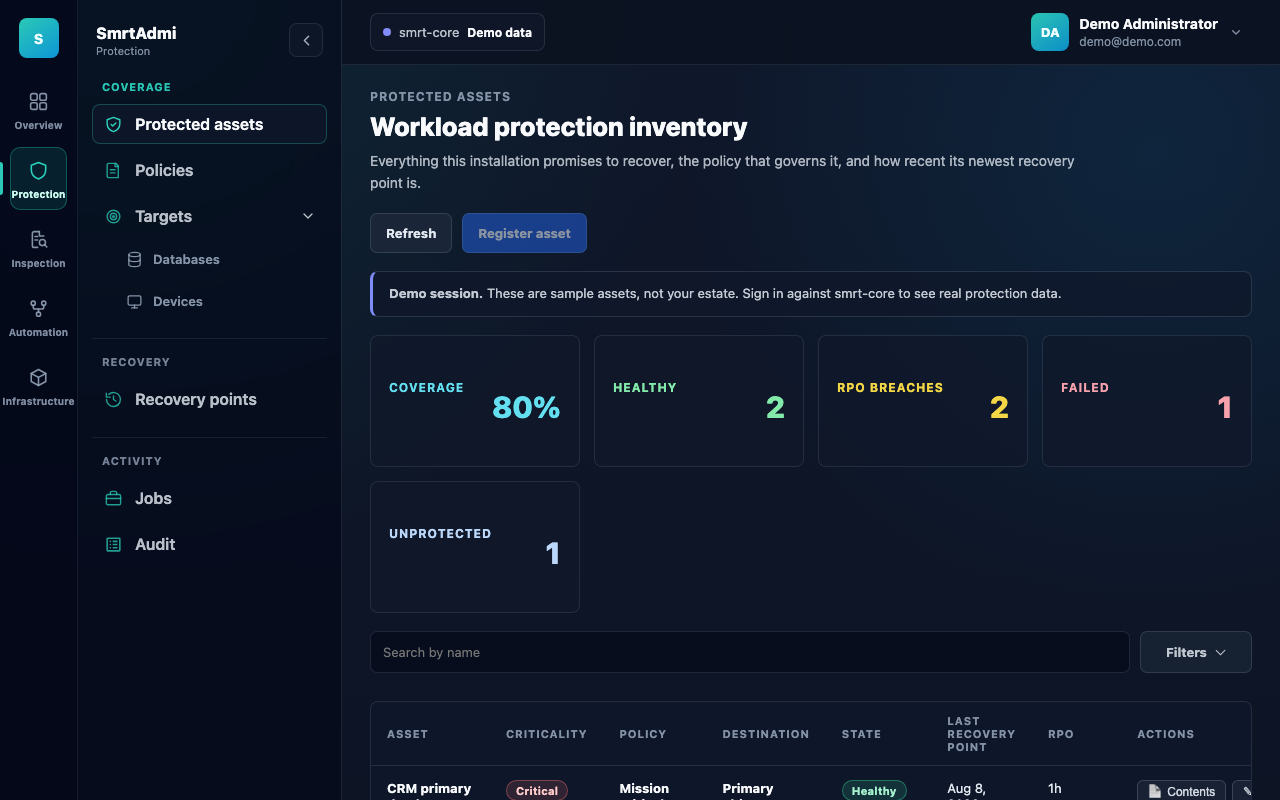
Every asset carries its criticality, the policy governing it, where its recovery points land, and how old the newest one is.
Policies
A policy declares three things:
- Cadence — how often a run starts, from hourly to monthly.
- Retention — how long recovery points survive.
- Immutability — whether a stored point can be altered before its retention expires.
Levels carry defaults, so declaring an asset critical yields an hourly, thirty-day, immutable policy rather than an empty form. Change the level later and the schedule re-bases unless you supplied one yourself. Deleting a policy that assets still reference is refused — an orphaned asset is an unprotected asset that still looks configured.
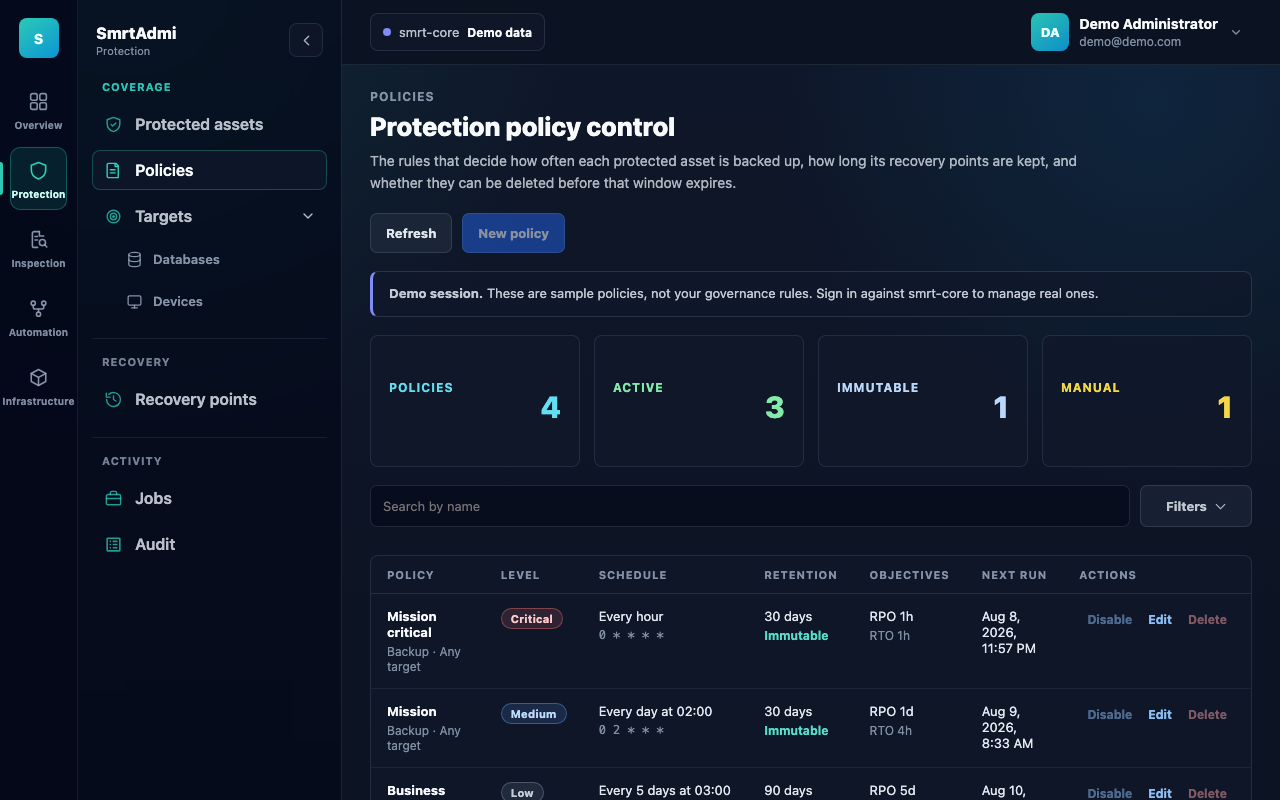
Cadence, retention, immutability and the RPO/RTO the policy commits to, on one row per policy.
Recovery points
Every successful run lands as a recovery point: an archive of what the agent uploaded, addressed by the asset it came from and the moment it was taken.
Restoring is a job, with its own progress, outcome and audit entry. It is not a button that returns to an idle screen and leaves you wondering.
Storage
Recovery points land where you tell them to — Amazon S3 or MinIO, Azure Blob, Google Cloud Storage, SFTP, NFS, or local disk. Your bucket, your region, your lifecycle rules. The platform holds the index; it does not hold your data hostage.
Inspection
The layer that makes the rest of it checkable. Inspection reads into an archive rather than reading a status column: it reassembles the uploaded chunks, walks one level into the filesystem archive inside, and rebuilds absolute paths so the file you select is the same file across two points taken weeks apart.
Three ways to use it:
- Compare files — pick two recovery points and see what actually differs between them, then read any file's contents side by side.
- Browse archive — walk a recovery point one directory at a time. Everything under a child directory folds into that child's row with a count, so the tree costs one request per directory however large the archive is.
- Search contents — put one query across several recovery points at once. The page makes the number of points an explicit choice and says how many it is about to read, because a tar has no index and every search streams whole archives.
Change detection is backed by content hashes — and when a hash is not available, the console says it fell back to size and modification time rather than presenting the weaker check as the same answer. A binary file is reported as binary rather than skipped, a partially-read file says so, and recovery points that failed to answer are named. "Not found" and "not looked at" are different answers, and only one of them is safe to act on.
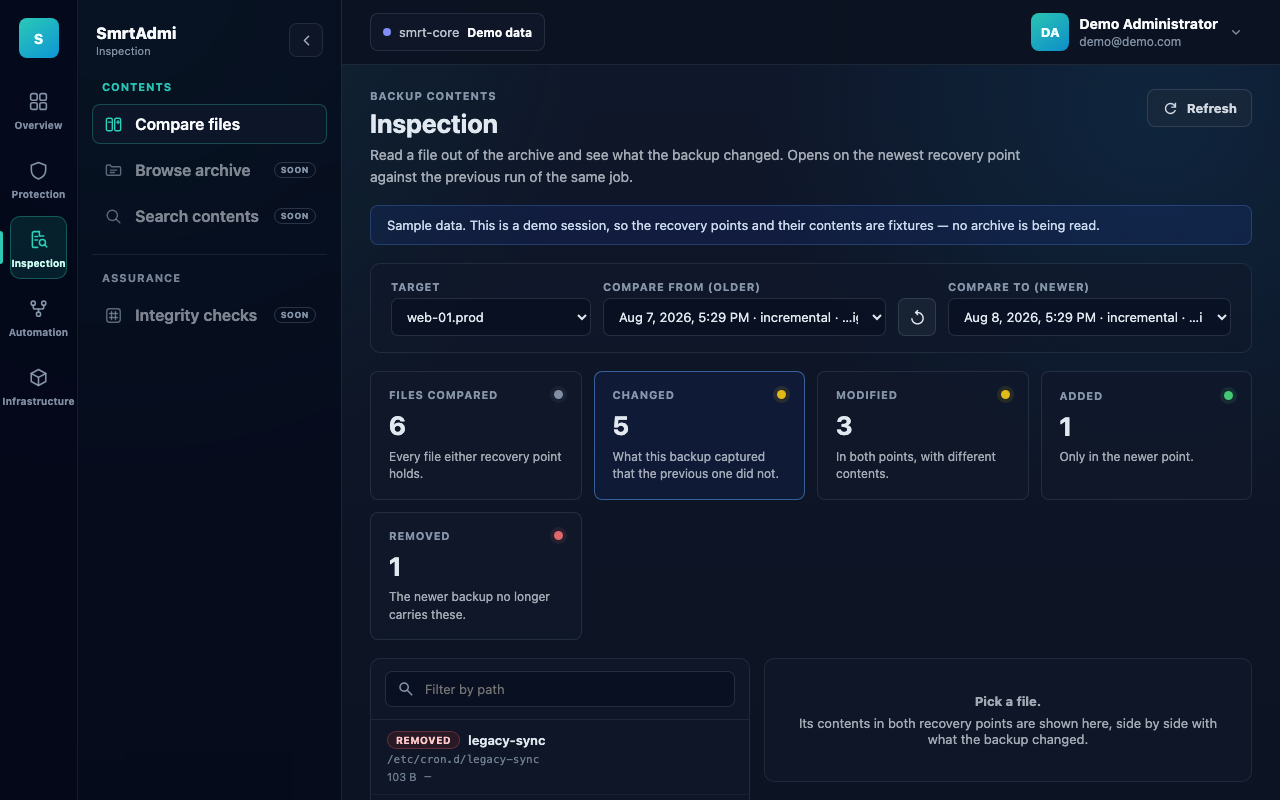
Pick two recovery points and the console tells you what actually differs between them — changed, modified, added, removed — then shows any file's contents side by side.
Reading into an archive requires project or platform administrator rights. Inspection is by design a read of the protected data itself, and should not be available to everyone who can merely see that a job succeeded.
Audit
Every operator action and every run is recorded — what ran, against which asset, with what outcome, initiated by whom, and when — and is queryable per database, per device, per cloud account and per job.